源码实现
RememberMeServices
JdbcTokenRepositoryImpl
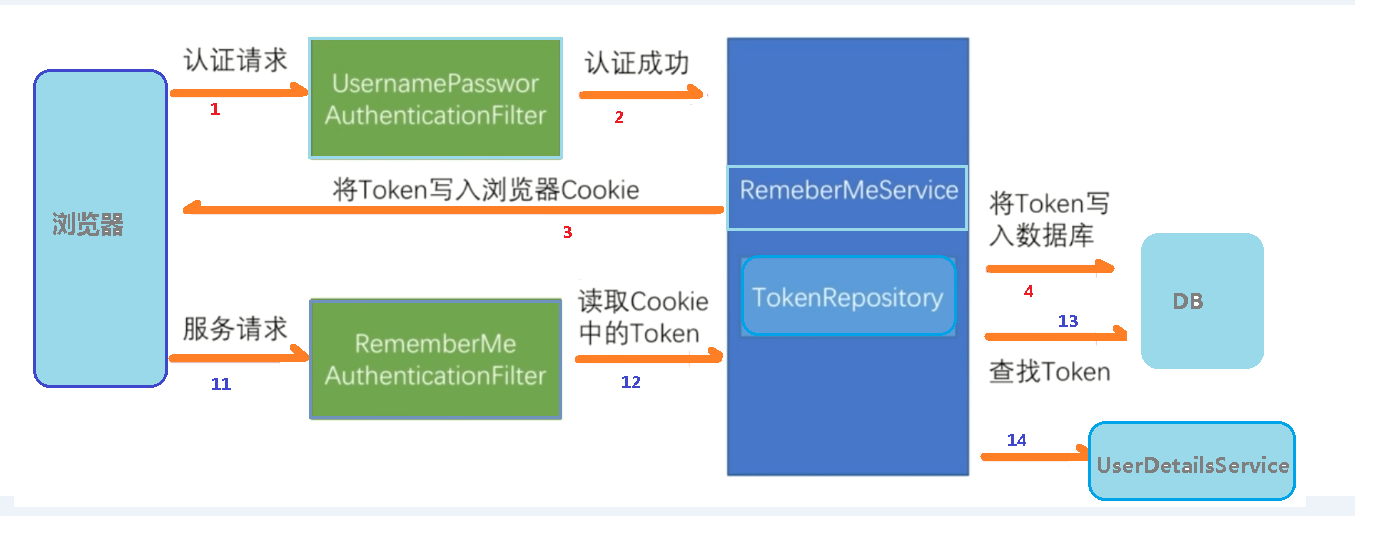
技术实现
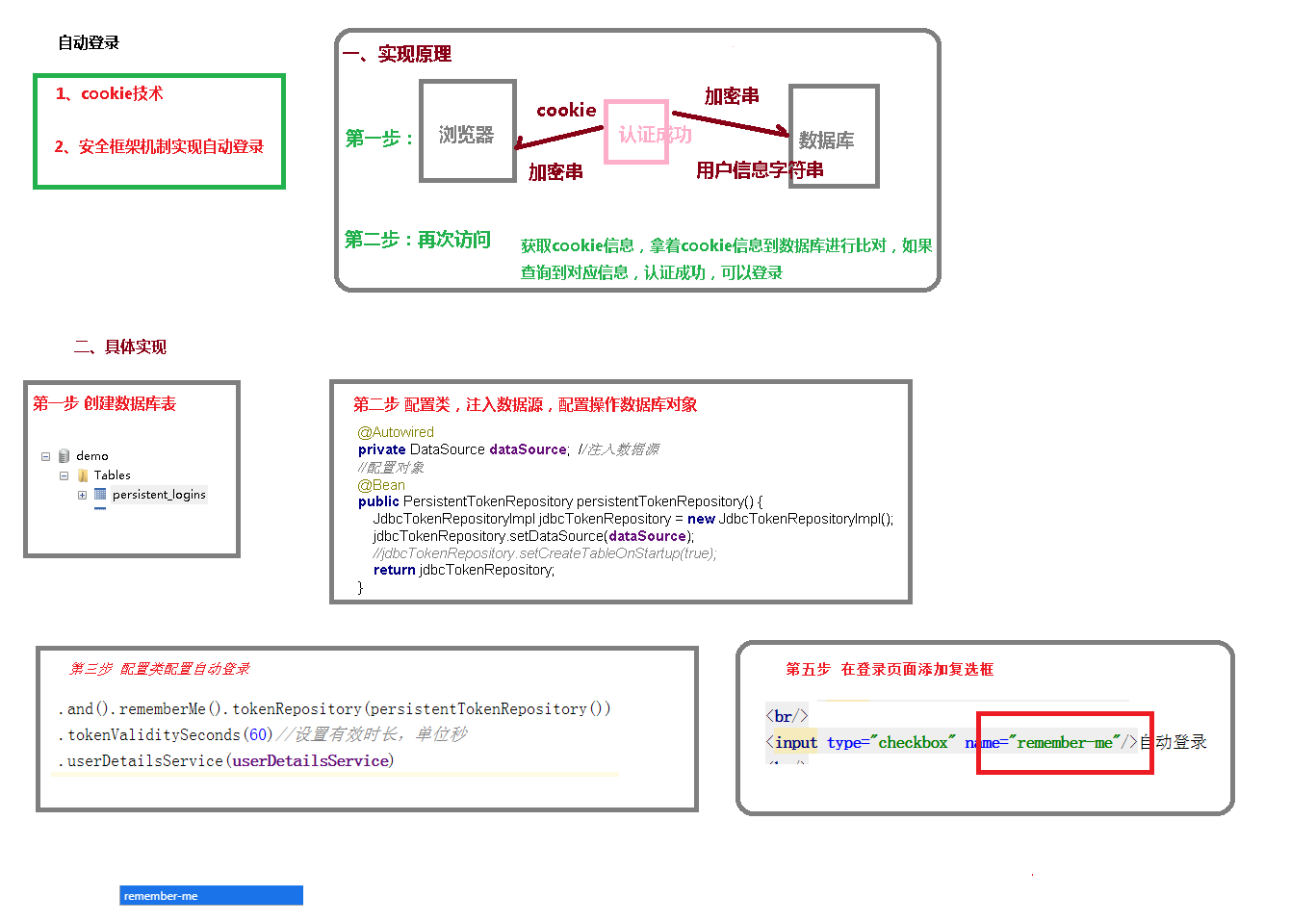
SQL记录表
CREATE TABLE persistent_logins (
  username varchar(64) NOT NULL,
  series varchar(64) NOT NULL,
  token varchar(64) NOT NULL,
  last_used timestamp NOT NULL,
  PRIMARY KEY (series)
) ENGINE=InnoDB DEFAULT CHARSET=utf8mb3;
页面:
<!DOCTYPE html>
<html lang="en">
<head>
    <meta charset="UTF-8">
    <title>登录</title>
</head>
<body>
        <form action="/user/login" method="post" >
            用户名:<input type="text" name="username">
            <br/>
            密码:<input type="text" name="password">
            <br/>
            <input type="checkbox" name="remember-me">自动登录
            <br/>
            <input type="submit" value="登录">
            <br/>

        </form>
</body>
</html>
配置类
package com.example.springsecuritydemo01.config;

import org.springframework.beans.factory.annotation.Autowired;
import org.springframework.context.annotation.Bean;
import org.springframework.context.annotation.Configuration;
import org.springframework.security.config.annotation.authentication.builders.AuthenticationManagerBuilder;
import org.springframework.security.config.annotation.web.builders.HttpSecurity;
import org.springframework.security.config.annotation.web.configuration.WebSecurityConfigurerAdapter;
import org.springframework.security.core.userdetails.UserDetailsService;
import org.springframework.security.crypto.bcrypt.BCryptPasswordEncoder;
import org.springframework.security.crypto.password.PasswordEncoder;
import org.springframework.security.web.authentication.rememberme.JdbcTokenRepositoryImpl;
import org.springframework.security.web.authentication.rememberme.PersistentTokenRepository;

import javax.sql.DataSource;

@Configuration
public class SecurityConfigDiy extends WebSecurityConfigurerAdapter {

    @Autowired
    private UserDetailsService userDetailsService;

    @Autowired
    private DataSource dataSource;

    @Bean
    public PersistentTokenRepository persistentTokenRepository(){
        JdbcTokenRepositoryImpl jdbcTokenRepository = new JdbcTokenRepositoryImpl();
        jdbcTokenRepository.setDataSource(dataSource);
        //自动创建自动登录信息记录表
//        jdbcTokenRepository.setCreateTableOnStartup(true);
        return jdbcTokenRepository;
    }

    @Override
    protected void configure(AuthenticationManagerBuilder auth) throws Exception{
        auth.userDetailsService(userDetailsService).passwordEncoder(passwordEncoder());
    }

    @Bean
    PasswordEncoder passwordEncoder(){
        return new BCryptPasswordEncoder();
    }

    @Override
    protected void configure(HttpSecurity httpSecurity) throws Exception{

        //退出
        httpSecurity.logout().logoutUrl("/logout")  //退出路径
                        .logoutSuccessUrl("/test/hello")    //退出成功的路径
                        .permitAll();

        httpSecurity.exceptionHandling().accessDeniedPage("/unauth.html");

        httpSecurity.formLogin()    //自定义自己编写的登录页面
                .loginPage("/login.html")    //登录页面设置
                .loginProcessingUrl("/user/login")  //登录访问路径 按登录按钮后跳转路径
                .defaultSuccessUrl("/success.html").permitAll()   //登录成功之后,跳转路径
                .and().authorizeRequests()
                .antMatchers("/","/test/hello","/user/login").permitAll()   //设置可以直接访问的路径
                //1.hasAuthority方法
                //.antMatchers("/test/index").hasAuthority("admins")
                //2.hasAnyAuthority方法
                //.antMatchers("/test/index").hasAnyAuthority("admins","query")
                //3.hasRole方法 ROLE_sale
                //.antMatchers("/test/index").hasRole("sale")
                //4.hasAnyRole ROLE_admin
                .antMatchers("/test/index").hasAnyRole("admin22")
                .anyRequest().authenticated()

                .and().rememberMe().tokenRepository(persistentTokenRepository())
                .tokenValiditySeconds(60*60)//设置有效时长 单位 秒
                .userDetailsService(userDetailsService)

                .and().csrf().disable();    //关闭csrf防护

    }
}